There is no concept of expiration date defined in the PDF specifications format, however, there is a workaround that we can apply expiration using JavaScript. Spire.PDF supports to add java script actions to PDF files as well. This article presents how to add a JavaScript expiration date to a PDF document using Spire.PDF in C# and VB.NET.
Step 1: Create an object of PdfDocument class and add a blank page to it.
PdfDocument doc = new PdfDocument();
doc.Pages.Add();
Step 2: Define the JavaScript code.
string javaScript = "var rightNow = new Date();"
                    + "var endDate = new Date('October 20, 2016 23:59:59');"
                    + "if(rightNow.getTime() > endDate)"
                    + "app.alert('This Document has expired, please contact us for a new one.',1);"
                    + "this.closeDoc();";
Step 3: Create a PdfJavaScriptAction object that performs the java script action in PDF document.
PdfJavaScriptAction js = new PdfJavaScriptAction(javaScript);
Step 4: Set the JavaScript as PDF open action.
doc.AfterOpenAction = js;
Step 5: Save the file.
doc.SaveToFile("ExpiryDate.pdf", FileFormat.PDF);
Output:
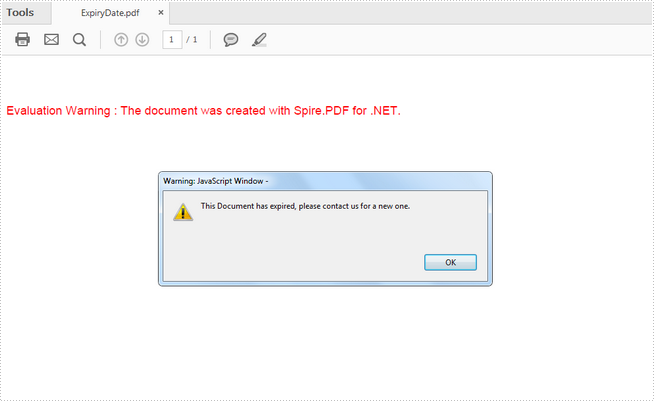
Full Code:
[C#]
using Spire.Pdf;
using Spire.Pdf.Actions;

namespace AddExpiryDate
{
    class Program
    {
        static void Main(string[] args)
        {
            PdfDocument doc = new PdfDocument();
            doc.Pages.Add();

            string javaScript = "var rightNow = new Date();"
                     + "var endDate = new Date('October 20, 2016 23:59:59');"
                     + "if(rightNow.getTime() > endDate)"
                     + "app.alert('This Document has expired, please contact us for a new one.',1);"
                     + "this.closeDoc();";
            PdfJavaScriptAction js = new PdfJavaScriptAction(javaScript);
            doc.AfterOpenAction = js;
            doc.SaveToFile("ExpiryDate.pdf", FileFormat.PDF);
        }
    }
}
[VB.NET]
Imports Spire.Pdf
Imports Spire.Pdf.Actions

Namespace AddExpiryDate
	Class Program
		Private Shared Sub Main(args As String())
			Dim doc As PdfDocument = New PdfDocument()
doc.Pages.Add()

String javaScript = "var rightNow = new Date();"
                    + "var endDate = new Date('October 20, 2016 23:59:59');"
                    + "if(rightNow.getTime() > endDate)"
                    + "app.alert('This Document has expired, please contact us for a new one.',1);"
                    Dim "this.closeDoc();" As +
Dim js As PdfJavaScriptAction = New PdfJavaScriptAction(javaScript)
doc.AfterOpenAction = js
doc.SaveToFile("ExpiryDate.pdf", FileFormat.PDF)
		End Sub
	End Class
End Namespace


No comments:
Post a Comment