Friday, November 19, 2021

What are interfaces

What are interfaces? 

Definition


Interfaces are contracts between two disparate pieces of code. That is, once an interface is defined and a class is defined as implementing that interface, clients of the class are guaranteed that the class has implemented all methods defined in the interface.


When you define an interface and specify that a class is going to make use of that interface in its definition, the class is said to be implementing the interface or inheriting from the interface. Interfaces are defined behaviors and a class is defined as implementing that behavior.


An interface looks like a class, but has no implementation. In addition to methods and properties, interfaces can declare events and indexers as well.


Few points regarding interfaces:  

  • Interface only has method declaration i.e. method prototype and signature.
  • Interface doesn't contain any field.
  • Interface provide base layer of functionality in OOAD (Object Oriented Application Design).
  • No access modifier is used with interface (By default it is public).
  • No abstract, virtual, static, sealed or override keywords are used with interface.
  • Interface can inherit interface with any type of inheritance.
  • Constructor can't be used in interface.
  • In .NET interface is used to allow multiple and hybrid inheritance ambiguity problem.
  • Structs can also inherit interfaces.

Practical demonstration of interface implementation


using System;


namespace interface_implementation

{

    class Program

    {

        public interface aa

        {

            // no access specifier is given in interface methods (by defualt they are public)


           int sum(int a, int b);

            void display();

        }


        public class XX : aa

        {


            public int sum(int a, int b)

            {

                return (a + b);

            }


            public void display()

            {

                Console.WriteLine("This method is declared in interface");

            }


            public void show()

            {

                Console.WriteLine("This is method of class XX");

            }

        }


        static void Main(string[] args)

        {

            XX obj = new XX();


            Console.WriteLine("Method sum " + obj.sum(12, 12));

            obj.display();

            obj.show();


            // You can create reference of a interface

            // So we can say interface is public


            aa obj1;

            obj1.display();


            // You can't create a instance of a interface

            //aa obj2 = new aa(); // this will give error

            Console.ReadLine();

        }

    }

}


Practical demonstration of multiple interface implementation


using System;


namespace interface_1

{

    class Program

    {

        public interface aa

        {

            int sum(int a, int b);

            void display();

        }


        public interface bb

        {

            int sumt(int a, int b);

            void display();

        }


// here the class is inherting more than one interface i.e. multiple inheritance

        public class XX : aabb

        {

            public int sum(int a, int b)

            {

                return (a + b);

            }


            public int sumt(int a, int b)

            {

                return (a - b);

            }


            public void display()

            {

                Console.WriteLine("This method is declared in interface");

            }


            public void show()

            {

                Console.WriteLine("This is method of class XX");

            }

        }


        static void Main(string[] args)

        {


            XX obj = new XX();


            Console.WriteLine("Method sum " + obj.sum(12, 12));

            Console.WriteLine("Method substract " + obj.sumt(12, 2));

            obj.display();

            obj.show();

            Console.ReadLine();

        }

    }

}


Practical demonstration of interface inheriting interface and than class is inheriting interfaces.


using System;


namespace interface_2

{

    class Program

    {

        public interface aa

        {

            // no access specifier is given in interface methods (by defualt they are public)


            int sum(int a, int b);

            void display();

        }


        public interface bb : aa

        {

            // no access specifier is given in interface methods (by defualt they are public)


            int sumt(int a, int b);

        }


        public class XX : bb

        {

            public int sum(int a, int b)

            {

                return (a + b);

            }


            public int sumt(int a, int b)

            {

                return (a - b);

            }


            public void display()

            {

                Console.WriteLine("This method is declared in interface");

            }


            public void show()

            {

                Console.WriteLine("This is method of class XX");

            }

        }


        static void Main(string[] args)

        {


            XX obj = new XX();


            Console.WriteLine("Method sum " + obj.sum(12, 12));

            Console.WriteLine("Method subtract " + obj.sumt(12, 2));

            obj.display();

            obj.show();


            Console.ReadLine();

        }

    }

}


Interface can be implemented in two ways:


1. Implicit manner of interface (Class binding)

2. Explicit manner of interface (Type name binding)


In interface implementation we have to implement all interface methods into derived class otherwise derived type must be marked, as abstract and interface method must be declared with abstract keyword.


Interface methods are public so you can't use any access modifier even public.


Above practical code were examples of implicit implementation of interface.


Practical demonstration of Explicit interface implementation


using System;


namespace interface_explicit

{

    class Program

    {

        public interface aa

        {

            int sum(int a, int b);

            void display();

        }


        public interface bb

        {

            int subt(int a, int b);

            void display();

        }


        public class XX : aabb

        {


            #region aa Members


            int aa.sum(int a, int b)

            {

                return (a + b);

            }


            void aa.display()

            {

                Console.WriteLine("Display method of aa interface");

            }


            #endregion


            #region bb Members


            int bb.subt(int a, int b)

            {

                return (a - b);

            }


            void bb.display()

            {

                Console.WriteLine("Display method of bb interface");

            }


            #endregion


            public void display()

            {

                Console.WriteLine("This is display method of XX");

            }

        }


        static void Main(string[] args)

        {

            XX obj = new XX();

            // here I m calling explicitly methods of aa interface

            aa obj_a = new XX();


            obj_a.display();

            Console.WriteLine("Sum method of aa interface : " + obj_a.sum(2, 2));


            // here I m calling explicitly methods of bb interface

            bb obj_b = new XX();

            obj_b.display();

            Console.WriteLine("Subtract method of bb interface : " + obj_b.subt(12, 10));


            // here i m calling class XX display method

            obj.display();


            Console.ReadLine();

        }

    }

}


Something about implicit and explicit implementation of interfaces


You can also explicitly use interface methods.


You can bind methods with interface or class. When we use explicit implementation of interface method will bind with interface.


When we use implicit implementation methods are bind with class.


In explicit implementation you can't use any access modifier.


Interface support multiple inheritance


Although a class can only inherit from one other class, it can inherit from any number of interfaces. C# support multiple inheritance with help of interfaces.


When inheriting from a class and one or more interfaces, the base class should be provided first in the inheritance list followed by any interfaces to be implemented. For example


class MyClass : Class1, Interface1, Interface2, Interface3 { ... }


Practical demonstration of interface and class implementation


using System;


namespace interface_3

{

    class Program

    {

        public interface aa

        {

            int sum(int a, int b);

            void display();

        }


        public interface bb

        {

            int subt(int a, int b);


        }


        public class XX

        {

            public void show()

            {

                Console.WriteLine("I m in class XX");

            }

        }


        public class YY : XXaabb

        {

            public int sum(int a, int b)

            {

                return (a + b);

            }


            public int subt(int a, int b)

            {

                return (a - b);

            }


            public void display()

            {

                Console.WriteLine("I m in class  YY");

            }

        }


        static void Main(string[] args)

        {

            YY obj = new YY();

            Console.Write("This method is of interface aa which is implemented by class YY");

            obj.display();

            Console.WriteLine("\n");

            Console.Write("This method is of class XX which is implemented by class YY");

            obj.show();

            Console.WriteLine("\n");

            Console.WriteLine("Method sum method of interface aa " + obj.sum(12, 12));

            Console.WriteLine("\n");

            Console.WriteLine("Method subt method of interface bb " + obj.subt(12, 12));

            Console.ReadLine();

        }

    }

}


Note: You can use shadowing (new) in interface also.


I think now you might be clear what interfaces are? How to implement interfaces and use it in a class? Have taken some definition from some references for technically defining interfaces.

Difference Between IEnumerable, ICollection And IList Interface

 IEnumerable, ICollection and IList are interfaces in the .Net Framework used the most often. IEnumerable is the base of the ICollection and IList interfaces (and many other). All these interfaces provide various functionalities and are useful in various cases.


IEnumerable Interface

IEnumerable interface is used when we want to iterate among our classes using a foreach loop. The IEnumerable interface has one method, GetEnumerator, that returns an IEnumerator interface that helps us to iterate among the class using the foreach loop. The IEnumerator interface implements two the methods MoveNext() and Reset() and it also has one property called Current that returns the current element in the list.

I have created a class StoreData for holding an integer type of data and this class implements the IEnumerable interface. Internally I have used a linked list for holding the data (you can find the advantages of a linked list from my previous article “http://www.c-sharpcorner.com/UploadFile/78607b/overview-of-linked-list/).

  1. class StoreData : IEnumerable  
  2. {  
  3.     LinkedList<int> items = new LinkedList<int>();   
  4.     public void Add(int i)  
  5.     {  
  6.        items.AddLast(i);  
  7.     }  
  8.     public IEnumerator GetEnumerator()  
  9.     {  
  10.        foreach (var item in items)  
  11.        {  
  12.           yield return item;  
  13.        }  
  14.     }  
  15. }  
In the preceding code I have created a custom storage list in which I can store integers (practically we can store any type of data depending on our requirements). We can use the preceding list as:
  1. static void Main(string[] args)  
  2. {  
  3.     StoreData list = new StoreData();  
  4.     list.Add(1);  
  5.     list.Add(2);  
  6.     list.Add(3);  
  7.     list.Add(4);  
  8.   
  9.     foreach (var item in list)  
  10.     {  
  11.         Console.WriteLine(item);  
  12.     }  
  13.               
  14.     Console.ReadLine();  
  15. }  
The preceding code will display all the values using a foreach loop. Instead of a foreach loop we can also use the following code:
  1. IEnumerator enumerator = list.GetEnumerator();  
  2.   
  3. while (enumerator.MoveNext())  
  4. {  
  5.    Console.WriteLine(enumerator.Current);  
  6. }  
Behind the scenes the foreach loop works as in the preceding code. The GetEnumerator() method is available with a list object since it implements the IEnumerable interface. Then by using the MoveNext() method and the Current property of the StoreData class we can display the data.

Note

Every collection inside the .Net Framework implements the IEnumerable interface.

Key points of IEnumerable Interface

It provides read-only access to collections. We cannot change any item inside an IEnumerable List. It provides a sort of encapsulation in cases where we don't want our list to be changed.

If we are dealing with some SQL queries dynamically then it also provides lazy evaluation. That means the queries will not be executed until we explicitly need them.

ICollection Interface

The ICollection interface is inherited from the IEnumerable interface which means that any class that implements the ICollection interface can also be enumerated using a foreach loop. In the IEnumerable interface we don't know how many elements there are in the collection whereas the ICollection interface gives us this extra property for getting the count of items in the collection. The ICollection interface contains the following,
  • Count Property
  • IsSynchronized Property
  • SyncRoot Property
  • CopyTo Method

The Count property is used for maintaining the count of elements in the list whereas the IsSysnchronized and SyncRoot properties help to make the collection thread-safe. The CopyTo method copies the entire collection into an array.

The generic version of this interface provides Add and Remove methods also.

IList Interface

The IList interface implements both ICollection and IEnumerable interfaces. This interface allows us to add items to and remove items from the collection. It also provides support for accessing the items from the index. This interface has more power than the preceding two interfaces.

The IList interface contains the following,

  1. IsFixedSize Property
  2. IsReadOnly Property
  3. Indexer
  4. Add Method
  5. Clear Method
  6. Contains Method
  7. Indexof Method
  8. Insert Method
  9. Remove Method
  10. RemoveAt Method

The IList interface has one indexer by which we can access any element by its position and can insert an element and remove an element at any position.

Introduction to Interfacing Win Forms with VS Add-ins

 In previous article, we had discussed about VS add-ins. In this article, we will look into interfacing Win Forms to it. Integrating Win Forms in add-ins gives a better UI for interactions. I am going to explain the integration by a sample. Open our VS 2008 and create a new VS add-in as explained in previous article with name as WinFormAddin.

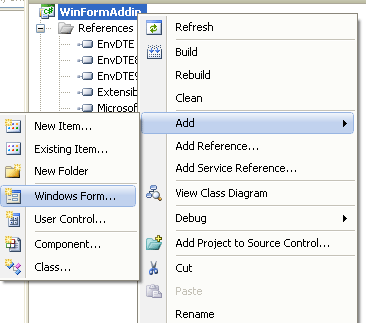
Now add a new Form named as MyForm to the add-in as shown below:

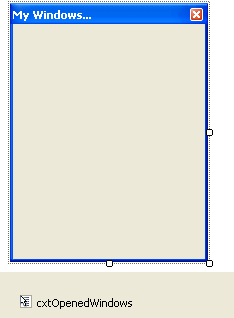
We will make our Form to show list of opened VS windows. Design the form as shown below:

Go to connect.cs and add below code to Exec method:

public void Exec(string commandName, vsCommandExecOption executeOption, ref object varIn, ref object varOut, ref bool handled)

                   {

                             handled = false;

if(executeOption == vsCommandExecOption.vsCommandExecOptionDoDefault)

                             {

                   if(commandName == "WinFormAddin.Connect.WinFormAddin")

                                      {

                                                handled = true;

MyForm objFrm = new MyForm((DTE2)_applicationObject);

objFrm.Show();

                                                return;

                                      }

                             }

                   }

Here, we are passing DTE2 to our form. By using this DTE2 instance, we can work on Visual Studio IDE events, windows etc. When we run our add-in, it will call Exec(). In this method, we are defining form's instance and passing DTE2 (_applicationobject) to it.

Now, go to code-behind of MyForm and add below code to it:

public partial class MyForm : Form

    {

        public DTE2 MyDTE;

        public List<Window> MyWindows = new List<Window>();

        public Button PrevButton;

        public int FormHeight = 25;

        public MyForm(DTE2 myDTE)

        {

            MyDTE = myDTE;

            InitializeComponent();

        }


        private void MyForm_Load(object sender, EventArgs e)

        {

            LoadAllWindows();

        }


        private void LoadAllWindows()

        {

            if (MyDTE != null)

            {

                cxtOpenedWindows.Items.Clear();

                MyWindows.Clear();

                this.Controls.Clear();

                //Get List of Opened Windows.

                for (int i = 1; i <= MyDTE.Windows.Count; i++)

                {

cxtOpenedWindows.Items.Add(MyDTE.Windows.Item(i).Caption, nullnew EventHandler(WindowHandler));

                    MyWindows.Add(MyDTE.Windows.Item(i));

                    Button btn = new Button();

                    btn.Text = MyDTE.Windows.Item(i).Caption;

                    btn.Height = 20;

                    btn.Width = this.Width - 10;

                    if (PrevButton == null)

                    {

                        btn.Top = 0;

                    }

                    else

                    {

                        btn.Top = PrevButton.Top + 20;

                    }

                    FormHeight += btn.Height;

                    btn.Click += new EventHandler(btn_Click);

                    PrevButton = btn;

                    this.Controls.Add(btn);

                }

cxtOpenedWindows.Items.Add("Refresh Windows"nullnew EventHandler(WindowHandler));

                this.Height = FormHeight;

            }

        }

        void btn_Click(object sender, EventArgs e)

        {

            string name = ((Button)sender).Text;

            OpenSelectedWin(name);

        }

        private void WindowHandler(object sender, EventArgs e)

        {

            string  name = ((ToolStripItem)sender).Text;

            OpenSelectedWin(name);

        }


        private void OpenSelectedWin(string name)

        {

           //To refresh Windows List.

            if (name == "Refresh Windows")

            {

                PrevButton = null;

                FormHeight = 25;

                LoadAllWindows();

                return;

            }

            foreach (Window w in MyWindows)

            {

                if (w.Caption == name)

                {

                    w.Activate();

                    break;

                }

            }

        }

    }

On Form load, we are getting list of opened windows using MyDTE.Windows collection. Than, we are creating a button and contect menu item for each opened window. Finally, on click of the button ; we are calling Activate() to set focus to the selected window. Run the application and select Tools  WinFormAddIn and the output will be as shown below:
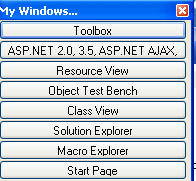
When we click on the button, it will set focus to that window. In this way, we can integrate win forms using DTE2 events and methods.

I am ending up the things here. I am attaching source code for reference. I hope this article will be helpful for all.

No String Argument Constructor/Factory Method to Deserialize From String Value

  In this short article, we will cover in-depth the   JsonMappingException: no String-argument constructor/factory method to deserialize fro...