Wednesday, November 3, 2021

What is AWS CloudFront?

 Introduction To AWS CloudFront

AWS Cloudfront is one of the leading content delivery network services or CDN. The CloudFront is a popular service to provide web content management and distribution service with scalable features. It processes and distributes both static and dynamic web content along with video and application files with low latency and high transfer rates. In addition, AWS Cloud front distributes the content that is sourced from the Amazon S3 bucket store through regional centers known as edge locations.

The CloudFront service supports caching for faster web content delivery based on the content available on the CloudFront edge locations. There are several case studies available for implementing services specific to the media and entertainment industry. Some of the popular applications using AWS CloudFront are Amazon prime videos, Spotify, Hulu, and Sky News. It is also widely used for software distribution lifecycles.

How to Configure CloudFront to Deliver Content?

A CloudFront distribution needs to be created, which tells the CloudFront that from where your content would be delivered and other details like how to manage content delivery etc.

  • Origin servers such as the Amazon S3 bucket needs to be specified. CloudFront accesses your files from these servers then distributes them globally through CloudFront edge locations.
  • After specifying origin servers, upload your files to these origin servers. Files uploaded are called objects, and they can be web pages, media files, or others that can be served over HTTP.
  • Then create a CloudFront distribution that would tell the CloudFront from which origin server it needs to access your files when users request them.
  • Then the CloudFront assigns a domain name to the newly created distribution of yours, which would be visible in the CloudFront console.
  • CloudFront sends the configuration of your distribution to all its edge locations, where copies of your objects are cached by CloudFront.

How is Content Delivered to Users by CloudFront?

After configuring CloudFront, user’s requests are handled as follows:

  • Any user can access your application or website and can request objects required, like an HTML file or media file.
  • When a request is sent by the user, Domain Name Server (DNS) sends or routes the request to the nearest CloudFront edge location or to an edge location that can best serve it.
  • At the edge location, There can be two possibilities, i.e. whether files requested are in cache or not. If files are in the cache then CloudFront returns them to the user, and if files are not present in the cache, then:
  • CloudFront compares the specifications in your distribution with the request. Then forwards the request to the origin server of your distribution, like the Amazon S3 bucket, for accessing the requested files.
  • The origin server sends the requested files to the CloudFront edge location.
  • When the first byte of the requested files arrives, CloudFront starts sending the files to the user.
  • It also saves the files to the cache of CloudFront edge location so that it could be accessed easily in the future if the same or another user requests them.

Advantages of AWS CloudFront

Below are mentioned the advantages :

  • Fast and time-saving
  • Can distribute data globally
  • Highly secure content delivery network.
  • Highly programmable
  • Highly or deeply integrated with Amazon Web Services (AWS)
  • Provides SSL optimizations and advanced capabilities like Field- Level Encryption, Session tickets, TLS Protocol Enforcements, etc.
  • Provides Access control.
  • Enables redundancy for origins
  • Optimal performance due to network optimizations.
  • Availability of a large number of tools such as CodeCommit, CodeDeploy, etc.
  • Pay- as- you- go feature i.e. cost-effective
  • Free transfer of data between Amazon CloudFront and AWS cloud services.
  • Integrating network
  • Geo-targeting
  • Removes invalid files

AWS CloudFront Case Studies

  • Hulu
  • Amazon Prime Video
  • Sky News
  • M6
  • Blue Billywig
  • TVNZ
  • Discovery Communications
  • Spotify
  • Bambuser
  • Seven Networks
  • Haystack TV
  • Outkast
  • NASA
  • Spuul
  • King Digital Entertainment PLC
  • Supercell
  • CCP Games
  • Lockwood Publishing
  • MovieStar Planet
  • Instacart
  • Amazon Fresh
  • Vivino
  • Digital Foodie
  • TicketLeap
  • Slack
  • Nextdoor
  • com
  • Tozny
  • my6sense
  • Desire2Learn
  • Canon
  • Mapbox
  • Dexecure

Use Cases of CloudFront

  • Static Asset Caching
  • Security
  • Live and On-Demand Video Streaming
  • Dynamic content
  • API Acceleration
  • Customizable content delivery using Lambda@Edge
  • Software distribution

Scope

Amazon CloudFront is the fastest growing service in all Amazon Web Services. Its low latency and highest throughput made it popular among companies who need rapid transferring of their content. It provides security while transferring data making it reliable to use. It is one of the most innovative, progressive, and innovative technology. It would help a lot in career growth.

Who is the Right Audience for Learning AWS CloudFront Technologies?

These technologies can be learned by anyone, but it will be easy if you have prior knowledge about some topics like:

  • Knowledge of Operating Systems
  • Knowledge of virtualization
  • Knowledge of networking
  • Knowledge of software engineering tools
  • Datacenter facilities

How will this Technology Help you in Career Growth?

This technology is fast growing and is very popular among renowned companies. There are multiple job opportunities across the globe in the field of AWS CloudFront. The salary of a Software engineer ranges from $83,000 to $124,000, and the salary of a Senior Software Developer ranges from $151,000 to $217,000.

Conclusion

This article gives you a brief about what is AWS CloudFront. This is an innovative, dynamic and exciting area to pursue your career. Thousands of job opportunities are available across the globe for people interested.

What is AutoScaling in AWS?


What is AutoScaling in AWS

Overview of Autoscaling in AWS

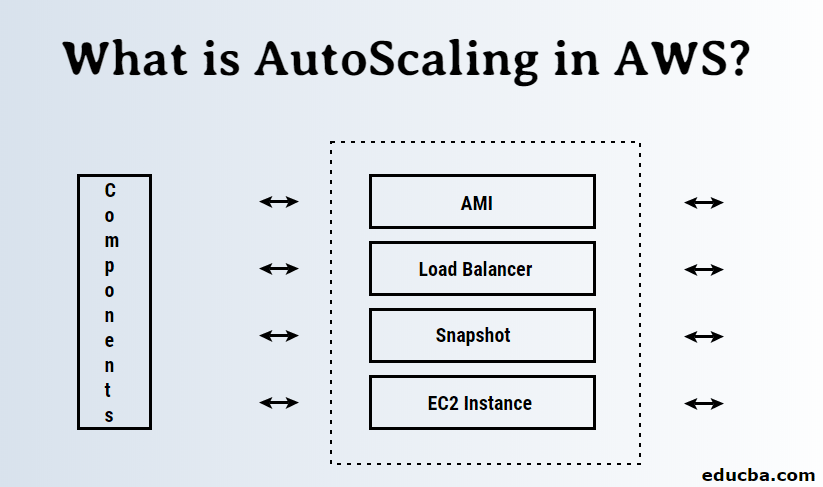
AutoScaling in AWS is the advanced cloud computing feature that provides automatic resource management based on the server’s load. The Resources associated with a server cluster generally scale up and scale down dynamically through mechanisms such as load balancer, AutoScaling groups, Amazon Machine Image (AMI), EC2 Instances, and Snapshots. The AWS AutoScaling feature helps in managing the pick time load in business. In addition, it optimizes performance and cost based upon on-demand requirements. AWS provides the flexibility to configure the threshold value of CPU utilization and any resource utilization level; once the load to the server reaches that threshold, the AWS cloud computes engine automatically enables and provision for scaling up the resources. Similarly, it automatically scales down to the default configuration level if the load is below the threshold.

How does Autoscaling work in AWS?

In AWS, there are multiple entities involved in the process of Autoscaling, which is:- Load Balancer and AMIs are two main components involved in this process. First, you need to create an AMI of your current server; in simpler terms, we can say a template of your current configuration consists of all the system setting and the current website. This you can do in the AMI section of AWS. If we go according to our above scenario and configured autoscaling, your system is prepared for future traffic.

When the traffic would start increasing, the AWS autoscaling service would automatically initiate the launch of another instance with the same configuration of your current server with the help of the AMI of your server.

Then comes the next part, where we need to divide or route our traffic equally among the newly launched instances; the load balancer in AWS would take care of this. Load balancer divides the traffic based on the load over a particular system; they do some internal processes to decide where to route the traffic.

The creation of a new instance solely depends on a set of rules defined by the user who is configuring autoscaling. The rules can be as simple as CPU utilization; for example, you can configure autoscaling when your CPU utilization reaches 70 -80 %, then you want to launch a new instance to handle the traffic. Of course, there can be rules to scale down also.

Autoscaling Components in AWS

There are many components involved in the process of autoscaling, some of them we already named before, like AMI, Load balancers, and there are some others as well.

Components involved in Autoscaling:-

  • AMI (Amazon Machine Image)
  • Load Balancer
  • Snapshot
  • EC2 Instance
  • Autoscaling groups

There can be more components, but you can say most of the components which can be scaled can be part of Autoscaling.

1. AMI

An AMI is an executable image of your EC2 Instance, which you can use to create new instances. For scaling your resources, you need your new server to have all the configuration of your websites and ready to launch. In AWS, you can achieve this by AMI’s, which is nothing but an identical executable image of a system that you can use to create new images, and AWS would use the same in case of autoscaling to launch new instances.

2. Load Balancer

Creating an instance is just one part of autoscaling; you also need to divide your traffic among the new instances, and the Load Balancer handles that work. A load balancer can automatically identify the traffic over the systems to which it’s connected and can redirect the requests on the basis of rules or in a classic way to the instance with less load. The process of dividing the traffic among the instances we call it load balancing. Load balancers are used to increase the reliability of an application and the efficiency to handle concurrent users.

A load balancer places a very important role in autoscaling. Typically load balancers can be of two types:-

  • Classic Load Balancer
  • Application Load Balancer
Classic Load Balancer

Classic load balancer follows a very simple approach; it will just distribute the traffic equally to all the instances. It’s very basic, and nowadays, nobody uses a classic load balancer. It could be a good choice for a simple static html page website, but in current scenarios, there are hybrid apps or multi-components and high computation applications which has numerous components dedicated to a particular work.

Application Load Balancer
  • The most widely used type of load balancer where the traffic is redirected on the basis of certain simple or complex rules that can be based on “path” or “host” or as user-defined.
  • It would be better if we take a scenario of a document processing application.
  • Let’s say you have an application based on microservice architecture or monolithic, and the path “/document” is specific to a document processing service and other paths “/reports,” which just shows the reports of the documents get processed and stats about processed data. We can have an autoscaling group for one server, which is responsible for processing the documents and another only to show the reports.
  • In application load balancer, you can configure and set rule according to a path that if the path matches “/document,” then redirects to an autoscale group for server 1 or if it matches with path “/reports,” then redirect it to an autoscale group for server 2. Internally one group can have multiple instances, and the load will be distributed in classical form means equally among the instances.

3. Snapshot

The copy of the data you have on your hard drive is typically an image of your storage. The typical difference between a snapshot and AMI is an executable image that can be used to create a new instance, but a snapshot is just a copy of the data you have in your instance. If you have an incremental snapshot of your EC2 instance, then a snapshot would be a copy of those blocks that are modified since the previous snapshot.

4. EC2 (Elastic Compute Cloud) Instance

An EC2 instance is a virtual server in Amazon’s Elastic Compute Cloud (EC2), which is used to deploy your applications on Amazon Web Services (AWS) infrastructure. EC2 service allows you to connect to a virtual server with an authenticate key via SSH connection and allows you to install different components of your application along with your application.

5. Autoscaling group

It is a group of EC2 instances and the core of Amazon EC2 AutoScaling. When you create an AutoScaling group, you have to give information about the subnets and an initial number of instances you want to start with.

What is AWS?

 AWS or Amazon Web Services is a cloud platform of Amazon that offers computing power, database storage, content delivery, and any other functionality that a basic cloud platform offers. It helps businesses to grow using different databases such as SQL, MySQL, Oracle, and SQL servers to store the information. Servers are rented out so that Amazon takes care of the security and maintenance of the servers and helps the business. 

It also offers migration, networking, development tools, and management to its clients. It is used by many companies, and its revenue is higher than any other large company.

What is cloud computing?

Cloud computing refers to a service hosted on the internet, and you can access the service remotely using the internet. The availability of a service like data storage, servers, or any computing resource over the internet is cloud computing. You don’t manage it personally, and it’s more like renting a resource.

Simply put, Cloud computing is the use of remote computing resources to store, manage and process data rather than a local server or personal computer.

Due to its huge success lot of people trying their hands-on cloud computing. There are a lot of players out there who are providing cloud services as listed,

  • Google Cloud platform
  • Amazon web service
  • Microsoft Azure
  • Digital ocean
  • IBM Cloud
  • VMWARE
  • Rackspace
  • Terredmark
  • Joyent

What is AWS?

It’s a platform where Amazon offers its cloud services like a database, servers, computing machines, file storage, etc., where you can rent them and pay for them according to your usage.

According to various sources, Amazon Web Services is a secure cloud services platform offering computing power, database storage, content delivery, and other functionality to help businesses scale and grow.

How does AWS make working so easy?

In the olden days, if you want to deploy an application you have to buy a server, and servers are not cheap pals. You need to invest a lot of money in it and a lot of time to setup up it. You also need to put up an infrastructure to maintain your server. If it went down, then you need to troubleshoot it and your business will be down for that time. Since websites have different peak times for traffic, we need to buy more servers to scale up or down. We have to manage everything manually. But with AWS, you don’t need to buy a server; you rent it and deploy and pay only for what you use. No more expensive server. Amazon will manage it for you. If the server goes down, Amazon will spawn up a new instance for your application. With this you don’t need to maintain an infrastructure for your servers; all you need is to concentrate on your business goals.

Top AWS Companies

  • Netflix – A Online video streaming company
  • NASA – Agency for aerospace research
  • Expedia – Online travel company
  • Slack – A professional messaging platform
  • Samsung – A mobile company, apps developed by Samsung are deployed using AWS.
  • Nokia – A mobile company
  • Adobe – Multimedia software company
  • Airbnb – Rental service for local stays

Advantages of AWS

In this section, we will compare three giants in cloud computing. According to a recent report, the following cloud players are ranked as the top three cloud providers.

  • Amazon web service
  • Microsoft Azure
  • Google cloud platform

Why AWS is on top of the other two?

The biggest factor for AWS’s success is because it offers more services compared to Azure and Google cloud. It continues to grow exponentially and supports recent technologies. The scope of operation that can be done on AWS is massive. It is more mature than the other two. Amazon’s biggest weakness is cost structure; it is very confusing for enterprises. Amazon supports all-level enterprises (from small to large).

Google Cloud and Microsoft Azure are late to market than AWS, and also, they offer fewer services than AWS. One of the biggest factors for the success of Azure is the Windows operating system is widely used. So, it makes sense to use Azure for Windows-based application servers. Google has really well-managed cost structure. It’s easy to get started with Google cloud than the other two.

What can you do with AWS?

AWS is not a single service; it offers a broad set of cloud-based products. Let’s see them one by one.

List of services provided,

  • Compute
  • Storage
  • Databases
  • Analytics
  • Networking and Content delivery
  • Mobile
  • Security, Identity, and Compliance
  • Migration
  • Developer tools
  • Management tools

1. Compute

You can deploy your application in computing. Compute is referring to computing powers. Some popular services in computing are Amazon.

  • EC2 for virtual machines
  • Elastic Beanstalk for automated deployments
  • Lambda to run functions without a server
  • Elastic load balances to balance the request handling capacity
  • Autoscaling to scale up or down according to the real-time requirements.

2. Storage

Amazon provides a file system as a service. With storage, you can store and access data on the internet based on demand. It is stored on a cloud computer. This gives you anywhere and anytime access to your files. Storage usually holds information that is used by applications. This is one of the main components as database, warehouse, backup; serving is based on some form of storage. Some popular services are

  • Simple storage service (S3) just like a file system to store files, folders, documents, images, songs, etc.
  • Elastic File System for EC2 instances
  • Glacier for storing the file for a long time at a low cost (Mainly used for archival service)

3. Databases

AWS offers a wide range of database services, From relational databases to NoSQL databases. We can also easily migrate our data to AWS by using a Database migration service.

  • Relational database service (RDBS) supports commonly used databases like MySQL, Oracle database, MS SQL Server, PostgreSQL SQL, and Amazon Aurora.
  • Redshift is close relative to PGSQL.
  • Elasticache supports in-memory cache services like Memcached and Redis.
  • DynamoDB is a highly scalable NoSQL database with very low latency.

Note: Please understand the difference between database and storage. Storage is a service based on the file system where you can store executables. But a database cannot include executable files.

4. Analytics

You can get insights into the data you have. You can also create visualizations on the data you analyzed. Some set of services like

  • Athena for running SQL queries on the S3 bucket.
  • Quick Sight for business insights and data visualizations.
  • Glue to create Extract Transform Load (ETL) systems.
  • Kinesis for performing Real-time analysis on streaming content
  • Elastic search and Cloud Search for creating a managed search engine

5. Networking and Content delivery

The main network-based services on AWS are Virtual private clouds which enable you to launch resource in the isolated network, direct connect let you establish a dedicated connection to connect with AWS, and Route 53 let you use a highly scalable Domain Naming System. For content delivery, we use CloudFront which is a caging service that allows us to cage the content to a location near the user. So, we reduce the latency for delivering the content.

6. Mobile

The set of services that lets you develop mobile apps or helps in developing mobile apps. You can use do analysis with the user data using these services.

  • The mobile hub for add, configure and design features for mobile apps.
  • With a device farm, you can test your mobile app on hundreds of devices.
  • Cognito for single sign-on integration with mobile apps.
  • Mobile Analytics for mobile data analysis

7. Security, Identity, and Compliance

For managing permission, access restrictions, Security management, Threat detection, we can use different services in this domain.

  • Identity and Access Management (IAM) allows you to create, manage and give different access to different users.
  • Inspector to search vulnerabilities on our virtual machines
  • Web Application Firewall (WAF) to protect from common attacks like XSS, SQL Injection, etc.
  • Key Management Service (KMS) for managing encrypted keys. You can create and control keys you used to encrypt data.
  • Guard Duty for detecting threats intelligently to protect AWS accounts.

8. Migration

You don’t need to worry about migrating data on AWS. You can get data or put data on AWS using their migration services. Also, you can migrate data from one database to another database.

  • Database Migration Service (DMS) for migrating data from a database to a database.
  • Server Migration Service (SMS) for migrating on-site servers quickly
  • Snowball can upload your data to S3, Pack and send the hard disk to AWS

9. Developer tools

Developer tools are used for managing software development life cycles. You can use these sets of services to create, build and deploy software applications.

  • Code-Star service for creating, managing, and working with software projects
  • Code-Commit is version control software like git
  • Code-Build is for building your code-base
  • Code-Deploy for automating the deployment of application
  • Code-Pipeline allows you to keep your eyes on building, testing, and deploying the applications.

10. Management tools

  • Cloud-Watch can be used to monitor resource utilization
  • Cloud-Trail logs all changes and API calls made to Amazon web services
  • Cloud-Formation is used to convert infrastructure into the cloud, so it will be like a template. You can create a production-ready environment in minutes.
  • A trusted advisor gives you recommendations on how to do cost optimization and secure your environment.

Why should we use it?

The benefit of using AWS is

  • Flexibility
  • Easy-to-Use
  • Secure
  • Reliable
  • Cost-Effective

The need for cloud computing is the basis of understanding any cloud provider. The main need for cloud computing is cost saving. Yes, with cloud computing, you can reduce hardware and software cost. You don’t need to maintain a server. Day-to-day issues with the server may be hectic if the company grows faster. All licenses or renewals are taken care of by cloud providers. With cloud computing, you can access your data and server anywhere, anytime. You don’t need to put extra care into securing your customer’s data. It will also be taken care of by cloud providers; your data will always be in good hands.

Who is the right audience for learning this technology?

This is purely based on your background, there are particularly three roles for AWS skills. They are

  • AWS Sysops
  • AWS Architect
  • AWS Development

If you are from an admin background, you can choose to learn some set of skills to become an AWS Sysops. It’s just like managing deployment, pipelines, and build processes. You may need expertise in IAM, VPC, Route53, ELB, etc.

If you are from a developer background you can go with a set of skills that supports SaaS-based applications. You may need expertise in the blockchain, Artificial intelligence, VR or AR, auto-scaling, load-balancing, etc.

For AWS architects, you need more experience working on the AWS platform. It’s like building a good infrastructure for an application that may require to meet specific needs. You can also be a junior cloud architect if you have good knowledge of the AWS platform.

How will this technology help you in career growth?

It’s not a coincidence that all tech gains jumping into cloud computing like Amazon, Google, Microsoft, IBM, Oracle, Alibaba. They have seen tremendous demand and scope in the market for cloud services. In upcoming years most of the apps and websites will be deployed on cloud-based service and will use cloud-based service for internal operations. If you start learning cloud technologies from now, it will help you to go up in your career.

Now, why AWS? Although there is a war going on between different cloud providers, King Amazon stays on top by owing 47.1% of shares in the public cloud sector. On the other hand, Azure has dominance in enterprise applications. Choose wisely according to your requirements.

Conclusion

Everything is turning into a cloud; we sync our contacts, photos, documents, etc., to a cloud. We are not storing our movies or video on our local storage or personal computer; we are streaming them today on Amazon or YouTube. We already started using cloud products without realizing them.

Cloud products are in our daily life, and AWS helps us to create, deploy and manage our applications. Most the companies are started using cloud services nowadays. So, to stay ahead on the road, we need to acquire those skills.

Monday, November 1, 2021

Error: error:0308010C:digital envelope routines::unsupported in webpack

Hello Guys, How are you all? Hope You all Are Fine. Today I am using webpack But I am facing following error Error: error:0308010C:digital envelope routines::unsupported in webpack. So Here I am Explain to you all the possible solutions here.

Without wasting your time, Let’s start This Article to Solve This Error.

How This Error Occurs ?

I am using webpack But I am facing following error.

Error: error:0308010C:digital envelope routines::unsupported
at new Hash (node:internal/crypto/hash:67:19)
at Object.createHash (node:crypto:130:10)
at BulkUpdateDecorator.hashFactory (/app/node_modules/webpack/lib/util/createHash.js:155:18)
at BulkUpdateDecorator.update (/app/node_modules/webpack/lib/util/createHash.js:46:50)
at OriginalSource.updateHash (/app/node_modules/webpack-sources/lib/OriginalSource.js:131:8)
at NormalModule._initBuildHash (/app/node_modules/webpack/lib/NormalModule.js:888:17) at handleParseResult (/app/node_modules/webpack/lib/NormalModule.js:954:10)
at /app/node_modules/webpack/lib/NormalModule.js:1048:4
at processResult (/app/node_modules/webpack/lib/NormalModule.js:763:11)
at /app/node_modules/webpack/lib/NormalModule.js:827:5 {
opensslErrorStack: [ ‘error:03000086:digital envelope routines::initialization error’ ],
library: ‘digital envelope routines’,
reason: ‘unsupported’, code: ‘ERR_OSSL_EVP_UNSUPPORTED’
}
command terminated with exit code 1

How To Solve Error: error:0308010C:digital envelope routines::unsupported in webpack Error ?

  1. How To Solve Error: error:0308010C:digital envelope routines::unsupported in webpack Error ?

    To Solve Error: error:0308010C:digital envelope routines::unsupported in webpack Error You just need to modify the webpack.config.cjs just update output key to include the hashFunction just like this: hashFunction: “xxhash64” Second solution is Just run this command in Your terminal: node –openssl-legacy-provider ./node_modules/.bin/gatsby build Now your error must be solved.

  2. Error: error:0308010C:digital envelope routines::unsupported in webpack

    To Solve Error: error:0308010C:digital envelope routines::unsupported in webpack Error You just need to modify the webpack.config.cjs just update output key to include the hashFunction just like this: hashFunction: “xxhash64” Second solution is Just run this command in Your terminal: node –openssl-legacy-provider ./node_modules/.bin/gatsby build Now your error must be solved.

Solution 1: modify the webpack.config.cjs

You just need to modify the webpack.config.cjs just update output key to include the hashFunction just like this.

module.exports = {
    output: {
        hashFunction: "xxhash64"
    }
};

Now, Your error must be solved.

Solution 2: Just use this command

Here is official Message : If you hit an ERR_OSSL_EVP_UNSUPPORTED error in your application with Node.js 17, it’s likely that your application or a module you’re using is attempting to use an algorithm or key size which is no longer allowed by default with OpenSSL 3.0. A new command-line option--openssl-legacy-provider, has been added to revert to the legacy provider as a temporary workaround for these tightened restrictions.

Just run this command in Your terminal.

node --openssl-legacy-provider ./node_modules/.bin/gatsby build

Now your error must be solved.

Solution 3: change the build script

You should change the build script something like this in your package.json.

{
"scripts": {
"build": "export NODE_OPTIONS=--openssl-legacy-provider; gatsby build"
}
}

Summary

It’s all About this issue. Hope all solution helped you a lot. Comment below Your thoughts and your queries. Also, Comment below which solution worked for you?

No String Argument Constructor/Factory Method to Deserialize From String Value

  In this short article, we will cover in-depth the   JsonMappingException: no String-argument constructor/factory method to deserialize fro...